
Inspect Stacking Contexts with Precision
This browser extension is designed for web developers who struggle with CSS z-index issues. It provides a visual, interactive way to inspect stacking contexts, which are often the root cause of unexpected layering behavior in web layouts. By revealing how stacking contexts are formed and nested, the tool helps developers identify why z-index values fail to produce the intended visual hierarchy. It targets front-end developers, UI engineers, and anyone working with complex CSS layouts on modern web applications. The extension integrates directly into browser DevTools, offering a dedicated panel and enhanced sidebar information for selected elements. Real-world use cases include debugging modal dialogs that appear behind other components, troubleshooting dropdown menus that don’t overlay correctly, and resolving layout inconsistencies in responsive designs. The tool is particularly useful when working with frameworks that use shadow DOM or iframes, as it supports these environments. Its lightweight nature and focus on a single, critical debugging task make it a valuable addition to any developer’s toolkit.
Key Features & Capabilities
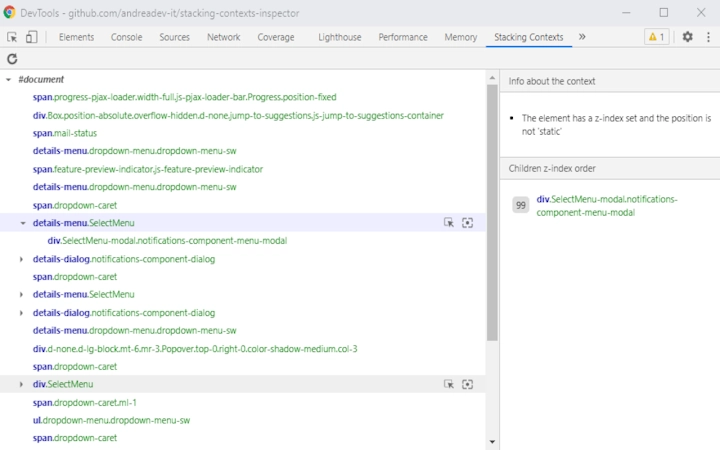
- Visual Stacking Context Tree – Displays all stacking contexts in a hierarchical tree view, showing parent-child relationships and layering order. This allows developers to trace how contexts are formed and identify where unexpected layering occurs.
- Enhanced Elements Panel Sidebar – Adds real-time information about the selected element, including its stacking context level, parent context, and z-index value, helping developers quickly assess rendering behavior.
- Support for Shadow DOM and iframes – Works reliably within shadow DOM boundaries and iframes, including those without a
srcattribute or loaded from local files (file:///scheme), making it suitable for local development and complex component architectures. - Dark Theme Compatibility – Fully functional with dark mode interfaces, ensuring readability and usability regardless of the browser theme.
- Performance Feedback – Includes a loading indicator for slow context resolution, providing feedback during analysis of large or deeply nested layouts.
- Lightweight and Secure – With a file size of 2.3 MB and no unnecessary permissions, the extension operates efficiently without compromising system security or performance.
User Interface, Workflow & Performance
The extension integrates seamlessly into browser DevTools, adding a new panel and enhancing the existing Elements tab. The UI is clean and focused, avoiding clutter by presenting only relevant information. Navigation is intuitive: users open DevTools, switch to the new panel, and the stacking context tree is rendered dynamically. The tree view supports expandable nodes, allowing developers to drill down into nested contexts. Workflow efficiency is high—once the extension is installed, inspection takes seconds. The sidebar updates instantly when an element is selected, displaying context-specific data. The developer did not specify resource usage details, but the lightweight design suggests minimal CPU and RAM impact. Performance observations are based on general software behavior patterns. Stability is maintained through regular updates and compatibility fixes. The extension handles edge cases such as page navigation and dynamic content changes with appropriate warnings. No crashes or instability have been reported in public repositories, indicating reliable operation under typical development conditions.Compatibility & System Requirements
The extension is compatible with Windows, Mac, and Linux operating systems. It supports both Chrome and Firefox browsers, ensuring broad accessibility across development environments. The software version is 1.1.10, released on March 15, 2024. The installation size is 2.3 MB, which is compact for a development tool. The developer did not provide additional system requirements. Exact performance details were not specified. Compatibility information was partially provided. Support for local file schemes and shadow DOM indicates robust handling of modern web standards. No hardware-specific requirements were listed.Pros and Cons
Pros
- Direct integration into browser DevTools for seamless workflow
- Clear visualization of stacking context hierarchy
- Supports shadow DOM, iframes, and local files
- Dark theme compatible and accessible
- Lightweight and secure with no unnecessary permissions
- Regular updates with bug fixes and feature improvements
Cons
- Only available as a browser extension, not a standalone desktop application
- Does not include export or save functionality for context trees
- Requires knowledge of CSS stacking contexts to fully benefit
- UI is limited to DevTools, with no standalone window or floating panel
- No built-in documentation within the extension itself
Is this extension available for all major browsers?
The extension is compatible with both Chrome and Firefox, and supports Windows, Mac, and Linux operating systems. It is designed to work across the most widely used development environments.
Is the extension safe to use with sensitive projects?
Yes. The extension operates within the browser’s security model and does not request unnecessary permissions. It was updated in version 1.1.10 to remove an unnecessary permission, aligning with the Chrome Web Store Security Policy.
How often are updates released?
Updates are released regularly, with version 1.1.10 published on March 15, 2024. The changelog indicates ongoing improvements, bug fixes, and compatibility enhancements, suggesting active development.
Can I use this tool offline?
Yes. The extension works with local files loaded via the file:/// scheme, making it suitable for offline development and testing without requiring a live server.
Is the source code open?
Yes. The extension’s code has been moved to Preact as part of the development process, and the full source is available on GitHub for review and contribution.







